 ROK Lyceum Bot
⚡
Full preloading
On launch the bot loads everything in the background (database, OCR, Gemini) and shows a READY status — nothing starts "from scratch" mid-game.
ROK Lyceum Bot reads questions off your screen, instantly matches the answer from a 1313-question database, and asks Gemini AI when it's unsure. All in a single .exe, with an English and Polish interface.
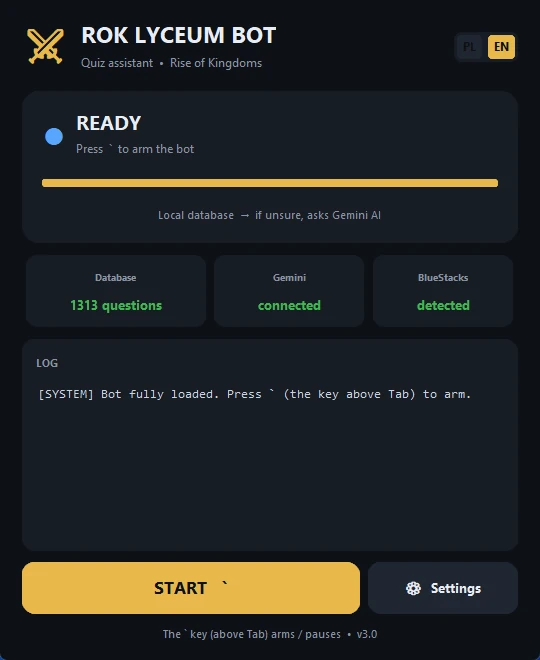
Fast, local, with an AI safety net — built to react instantly.
On launch the bot loads everything in the background (database, OCR, Gemini) and shows a READY status — nothing starts "from scratch" mid-game.
A single press of the key above Tab arms or pauses the bot — no console window, no delay.
A fast local database first. When the match is uncertain, the question goes to Gemini AI.
The bot reads the question and answers in a 2×2 layout straight from the game window and clicks the right button.
Full Polish/English translation with a live switch. Your language choice is remembered.
Enter your API key once in Settings — it's saved on your computer and you can change it anytime.
No installation, no configuration — just run the file.
Launch Rise of Kingdoms in BlueStacks and open the Lyceum of Wisdom.
Open ROK Lyceum Bot.exe and wait for the READY status.
The key above Tab arms the bot — from now on it answers questions on its own.
A clean, dark interface with a live log and a settings panel.
Progress bar, Gemini connection status, number of questions in the database and BlueStacks detection — all at a glance.
A single .exe (~130 MB), no installation. Keep it in one folder with the question database and you're done.
⬇ Download for WindowsA free assistant for the Lyceum of Wisdom (Peerless Scholar) in Rise of Kingdoms. It reads the on-screen question via OCR, matches the answer from a 1313-question database, and when unsure it asks Gemini AI, then clicks the answer for you.
Launch the game in BlueStacks, run ROK Lyceum Bot.exe and wait for the READY status. Then press the ` key (above Tab) to arm the bot.
Not required — the bot uses a local 1313-question database first. A free Gemini key from aistudio.google.com improves accuracy on unusual questions. You enter it once in Settings.
Yes. The interface switches between English and Polish with one click and your choice is remembered on your computer.
No. It is an unofficial, fan-made tool, not affiliated with Lilith Games or the game Rise of Kingdoms. Use at your own risk.